
GitHub is one of the most popular platforms, used for code repositories and active code sharing by developers. In technical terms, GitHub is a web platform hosting several Git repositories for developers to use as tools for collaboration and version control. Additionally, it also has a social networking aspect that allows developers to find open source libraries and connect with other developers.
Irrespective of whether you are working on a small-scale project or a large enterprise-grade software development, GitHub can easily streamline the source code management and protect the intellectual property. A recent early 2026 report specifies that there are over 180 million developers active on GitHub, with access to over 630 million repositories. This explains the dominance of this platform for assisting developers to create new code, build web pages, update content, and more.
If you are new to the software development arena and are willing to join GitHub, this article will be your guide to understanding what it is and how you can effectively use the platform to your benefit.
How are Git and GitHub Related?
GitHub is the combination of Git, a version control system, and a hub backed with a plethora of collaboration and project management features.
What is GitHub Used For?
People refer to GitHub as the social coding platform, as it allows users to request one another on development queries or internally discuss specific code iterations. Moreover, this platform also encourages people to coordinate, collaborate, and share code across asynchronous and distributed environments.
Some of the important use cases of GitHub are:
-
Version Control:
GitHub makes use of Git’s version control system, which actively tracks code changes. Git enables developers to work on a single project simultaneously without overwriting anyone’s changes. Moreover, GitHub also keeps a track of all the changes made to the code, making it easier to revert to prior versions when needed.
-
Collaboration
GitHub is primarily designed to support collaborative work, allowing multiple developers to contribute to a project, discuss potential issues, review code, and merge respective changes. Thus, GitHub becomes an ideal platform for dealing with open-source projects and facilitating team-based development.
-
Project Management
GitHub brings together developers and project managers to come together for coordinating, track, and update their work, ensuring the projects stay on schedule and are transparent. GitHub has a plethora of tools that you can use for managing diverse projects, such as Pull Requests, Issues, Project Boards, and more. Using these features, you can keep track of bugs, tasks, and enhancements, which makes it easier for seamless workflow management.
-
Package Safety
All the packages can be published either publicly for the open-source community or privately with the team. These packages, containing libraries, container images, or software dependencies, can be downloaded from GitHub for reuse.
-
Team Management
GitHub enables the team members to stay organized and be aware of the recent changes being made. The moderation tools, such as Pull Request Locking and Issues, can help a team focus on the code.
-
Improved Code Writing
Using Pull requests, organizations can propose, develop, or review new code. Moreover, the team members can also discuss any code proposals or implementations through GitHub, prior to changing the source code.
-
Github Action
GitHub Actions, built within GitHub, is a CI/CD (Continuous Integration/Continuous Deployment) platform that enables developers to automate building, testing, and deployment pipelines. Developers can create dedicated workflows to build & test the pull requests to their repositories or deploy the merged requests into the production environment.
-
Enhanced Code Safety
GitHub makes use of dedicated tools for identifying & analyzing code vulnerabilities, enabling development teams across organizations to work together for securing the end-to-end software supply chain.
-
Code Hosting
Considering there are millions of repositories available on GitHub, each one of them has its own set of tools for helping you host & release the code.
How to Get Started with GitHub?
To get started with using GitHub, you must first start with the basics. You ought to be familiar with how the platform works, considering that these are the initial steps for you to get started:
Step 1: Joining GitHub
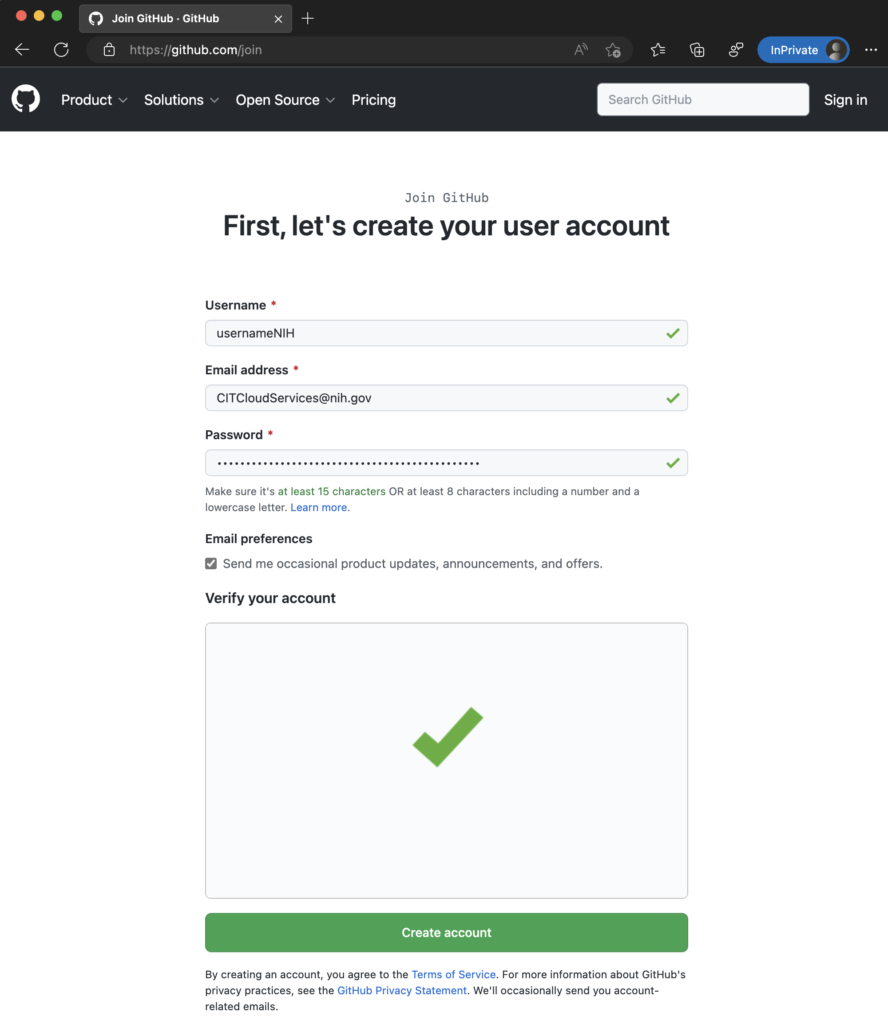
- First, you will need a GitHub account to get started with using the platform.
- Sign up for GitHub for free, and you can use the software, giving you access to numerous public and private repositories.
- The free plan limits the number of collaborators that you can have on any private repository. Currently, there is a limit of three, which is ideal for beginners to learn using the platform.
Step 2: Install Git
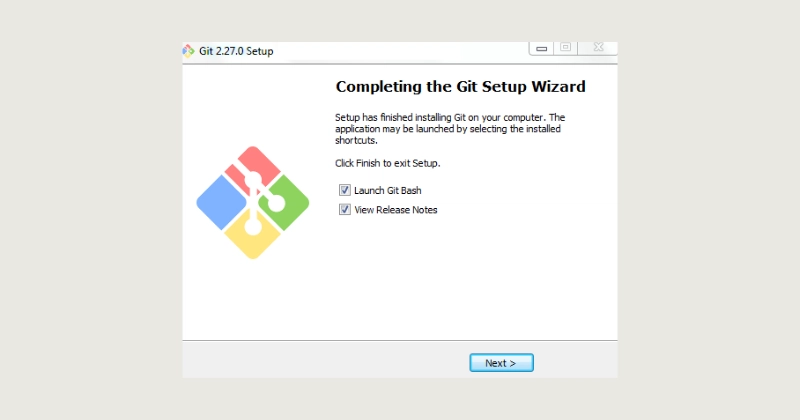
- Once you have your account live on GitHub, you must then install Git.
- Git is the technology that tracks code changes and makes it easier for developers to coordinate and collaborate on tasks.
- You can then use Git for collaborating and coordinating with other developers for your sophisticated development projects.
Step 3: Create a Repository
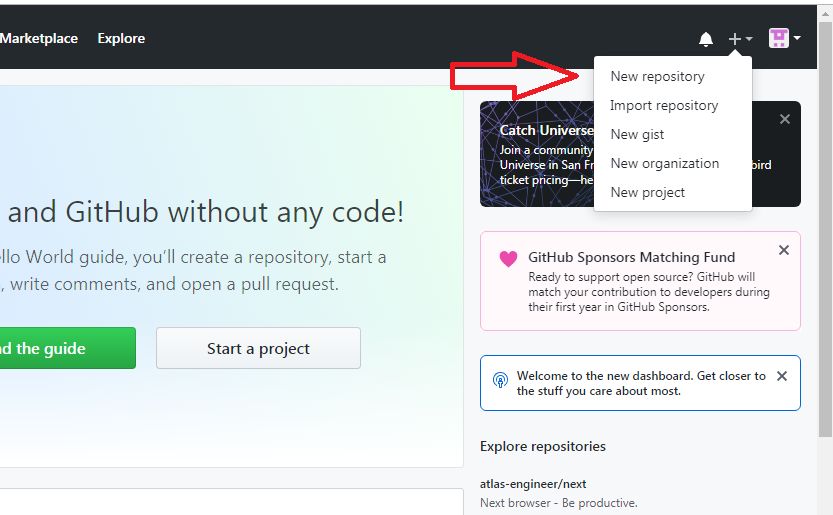
- For doing almost anything on GitHub, you must have a repository, which is referred to as a project that will store everything related to it, such as images, videos, files, datasets, and others.
- It is recommended that you add a README file while creating a repository.
- You can simply click on the “New Repository” button to make your repository. Following that, you must then name the repository and give a description of it.
Step 4: Create a Branch
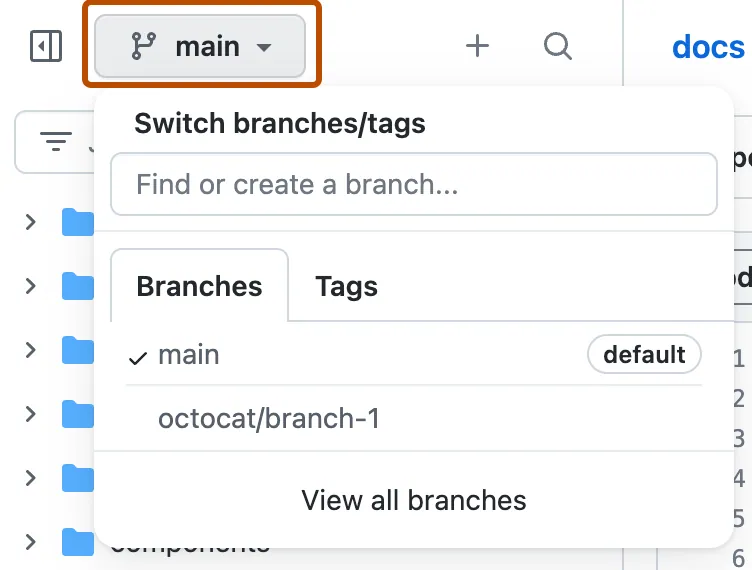
- Your repository or project might have multiple versions while you collaborate. Therefore, creating a branch would enable you to edit different project versions and make required changes without affecting the original code.
- The repository you create will have an automatic branch named Master.
- Using GitHub, you can create multiple branches and simplify working and commit the code changes to your Master branch whenever required.
- The first branch you create will be a copy of the Master branch,
- Start a new branch within the repository by clicking on the dropdown referring to “branch:master”, and give a desired name to it.
- Using branches, you can easily add new features or fix code bugs.
Step 5: Create and Commit the Changes
To make any changes to your branch in GitHub, you need to follow the steps:
- Access the ‘Code View’ of the branch.
- Choose the file that you want to change.
- Click on the ‘Pencil’ icon.
- Make the changes as required.
- Describe the changes in the Commit Messages.
- Click on the “Commit Changes” button.
Step 6: Open & Merge a Pull Request
- You must then open a pull request anytime you want to merge a branch with someone else’s branch.
- Make the “Pull Request” when you make a commit.
- Make it a habit to mention the person you are seeking feedback from by using “@” while opening a ‘Pull Request”
To open a “Pull Request,” you can follow the steps below:
- Go to the “Pull Request” tab.
- Click on the “New Pull Request” button.
- Find the newly created branch in “Example Comparisons.”
- Compare the branch with the Master branch.
- Select the “Create Pull Request” button.
- Give the desired title and description for the Pull Request.
- Finally, select the “Create Pull Request” button to complete the process.
Final Thoughts
With this, you are now ready to get started with GitHub and its associated technologies. It is a powerful platform that leverages the potential of version control and facilitates collaboration for developers. By gaining an insight into GitHub’s core features and steps on how to use it, you will be able to improve the overall workflow and collaborate effectively with other expert developers.
Whether you are working on your individual project or are part of a big team, GitHub has all the required tools for you to seamlessly manage your code and execute the development process. Take expert assistance or enroll in a course to master the use of GitHub for your advancing career as a developer!